
FAQs
When are the Empowerment Sessions?
1
Each month we share the link with the dates for that month. The Empowerment Sessions are for your future partners and last 1 hour and 30 minutes.
Remember before entering:
● Punctuality — 5 minutes tolerance.
● Camera on all the time.
● Active participation (do not drive or do other activities).
● Full name visible in Zoom.
● Attendance is taken at the end of the session.
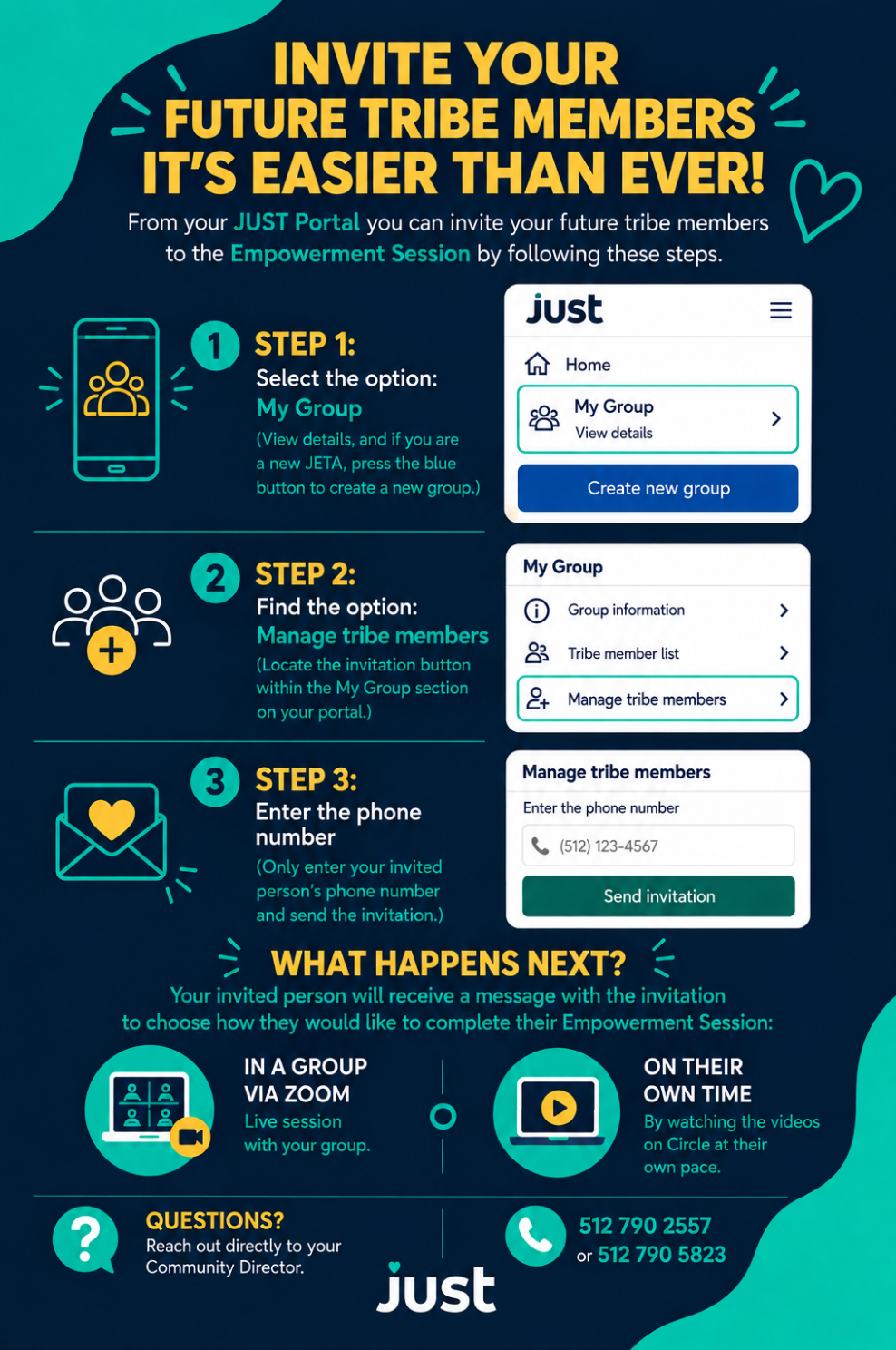
Invite your future partners from your JUST Portal
Inviting people is now easier. From your portal, follow these 3 steps:
What happens next?
Your guest receives a message with the invitation and chooses how to complete her Empowerment Session:
● In a group via Zoom — live session with your group.
● Individually — watching the videos from Circle, at your own pace.
How do I access my portal?
2
Log in to the JUST Portal with your phone and password here: hellojust.my.site.com/Portal.
How do I reset my password?
3
Log in to the JUST Portal and select the "Forgot my password" option. You will receive a text message to create a new password.
How do I make my payment?
4
Log in to your portal and go to "Make a payment". Click "One-time payment" and choose your payment method.
How do I activate my auto-payment?
5
Log in to your portal and go to "Make a payment". Press "Set up auto-payment" and fill in the corresponding information.
How do I verify that my self-payment is correct?
6
Log in to your portal and go to "Make a payment". There you can see if your autopay is active: a green button will appear that says "Autopay on".
Can I check my payment history or find out if a payment was processed?
7
Yes. Log in to your portal, go to "Make a payment," and scroll down to "Transactions." There you'll see all the payments you've made on JUST.
Can I pay in advance?
8
Yes, you can prepay, although you won't be able to renew until your scheduled renewal date. If you're a member of the Investors Club, you can renew up to four weeks early starting with your second loan.
How do I update my bank account?
9
How to Update Your Bank Information
Log in to your user portal.
Select Profile from the menu.
In the top right-hand corner, click on Change Bank Information.
Update your bank account number and routing number.
Click Next to save the changes to your profile.
To verify that your information has been successfully updated, scroll to the bottom of the page where your current account details will be displayed.
Can I check my bank information?
10
Yes, go to the "Profile" tab on your portal and you can check your banking information there.
Can I check the status of my partner's loan or application?
11
Each member must log into their own portal: there, on the main page, they will see the status of their application, their remaining payments, and their complete history.
What is the member limit for my group?
12
The limit is 9 members plus one JETA (JUST Entrepreneur Taking Action).
When am I eligible to renew?
13
Log in to your portal and check how many payments you have left. If you're in the Wealth Club, you can renew up to 4 weeks in advance.
Can I change groups?
14
Yes, as long as your tribe member is also up to date with their payments. If your JETA is overdue, you can also switch groups, provided neither you nor your partner are in collections.
How do I add or remove members from my group?
15
Follow the instructions in this video to manage your group members (add a member from another group or remove a member):
How do I report someone to the Red List?
16
Fill out this form to report someone who should no longer be in our trusted community: Red List Form.
How do I schedule a visit for my group?
17
Contact your Community Director at 512-790-5823.
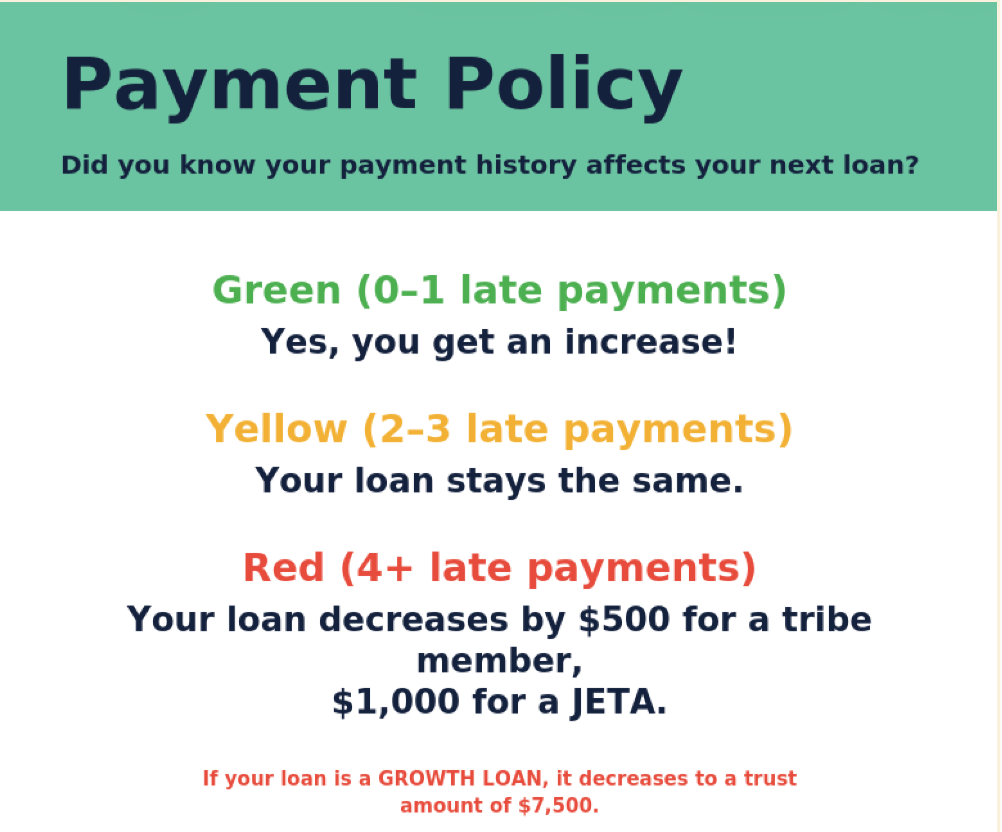
Payment policy: Your payment history affects your next loan.
18
Do you have questions that aren't answered here?
19
Call Customer Service: 512-790-2557